Sending a text from your email used to work for almost any US carrier. You'd address an email to the recipient's phone number at their carrier's domain, and it would arrive as a standard SMS. Most major carriers have now shut down that service. AT&T closed its gateway in June 2025, T-Mobile stopped delivering in late 2024, and Verizon is phasing out by March 2027. The method still works for smaller carriers like US Cellular and Google Fi, but for most recipients in 2026, it won't reach them.
Where it does still work, the mechanics are simple. You compose a regular email, enter the recipient's phone number plus the carrier's gateway domain in the To field, keep the body under 160 characters, and send. No app, no extra account. If the recipient replies, it comes back to your inbox as an email.
SMS gateway addresses: Current status
Before sending, check the status column. Several carriers in the table below no longer operate active gateways. Sending to a dead gateway results in a silent failure in most cases: the message appears to send from your end but never arrives, with no bounce or error notification.
For recipients on AT&T, T-Mobile, Cricket, or Boost Mobile, the free carrier gateway no longer works. For Verizon, delivery is inconsistent and getting worse as the March 2027 shutdown approaches. If you need to reliably reach someone on one of these networks, skip the gateway method and use a dedicated email-to-SMS service instead (covered below).
How email to text works
When you send an email to a gateway address, the carrier's server accepts it, strips any email formatting, and delivers the content as a plain SMS to the phone number in the address. Send to 5551234567@email.uscc.net and a US Cellular subscriber gets a text. The sender ID the recipient sees varies: some carriers show a gateway number, others show your email address.
Replies route back to your inbox in most cases. Some carriers don't support two-way replies reliably, so it's not guaranteed, but for straightforward outbound messages it generally works where the gateway is still active.
How to send a text from Gmail
Sending a text from Gmail uses the same Compose window you already know. The only difference is what you put in the To field.
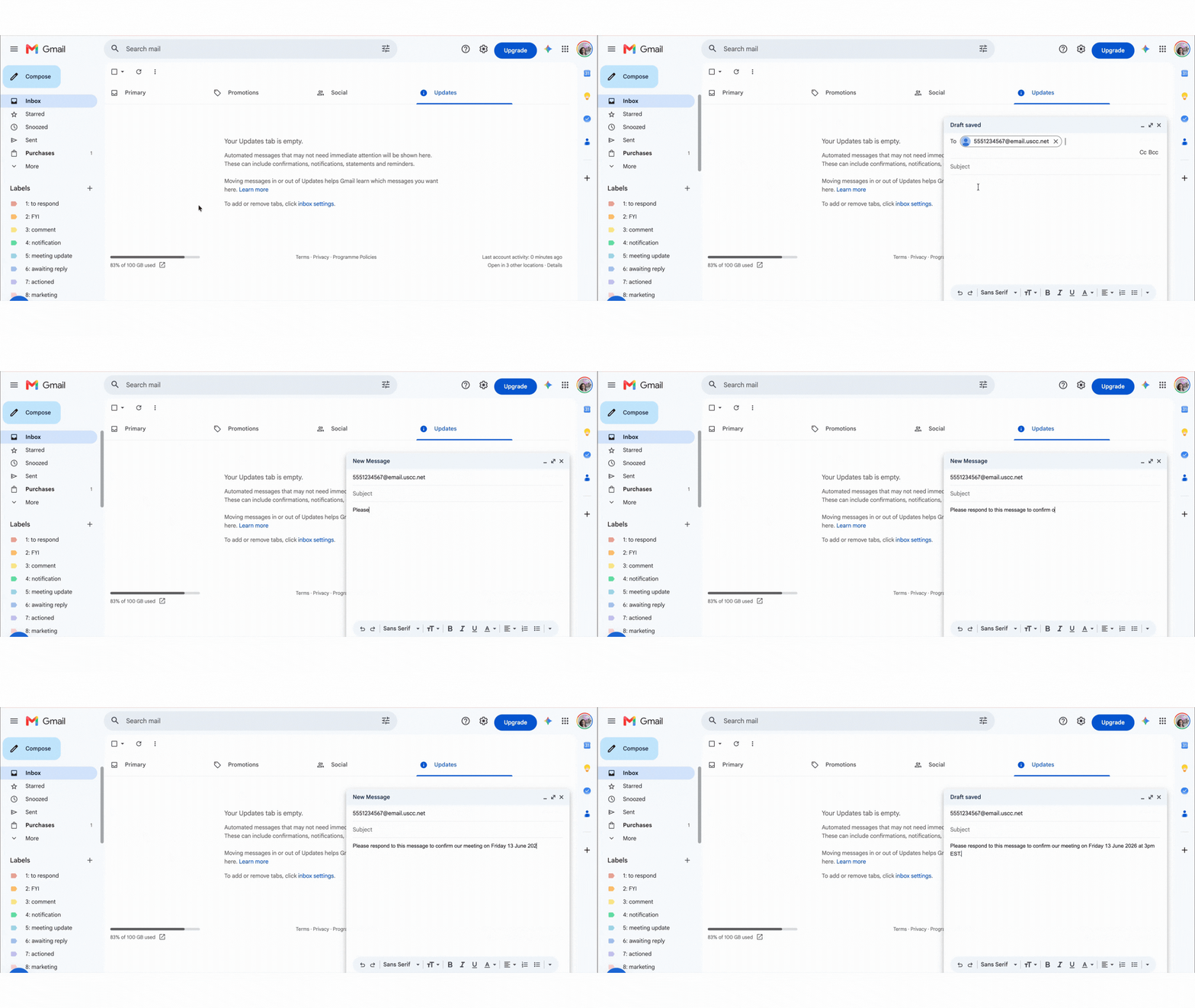
- Open Gmail and click Compose.
- In the To field, enter the gateway address for the recipient's carrier (e.g., 5551234567@email.uscc.net).
- Leave the subject line blank.
- Keep your message body under 160 characters.
- Click Send.
The 160-character cap is the standard SMS limit. Go over it and behavior varies by carrier: some split the message, some truncate, a few drop it. Write it the way you'd write a text: short and direct.
How to send a text from Outlook
The process in Outlook mirrors Gmail exactly, with one thing to watch for before you hit Send. Outlook has a habit of auto-formatting addresses, so checking the To field takes an extra second.
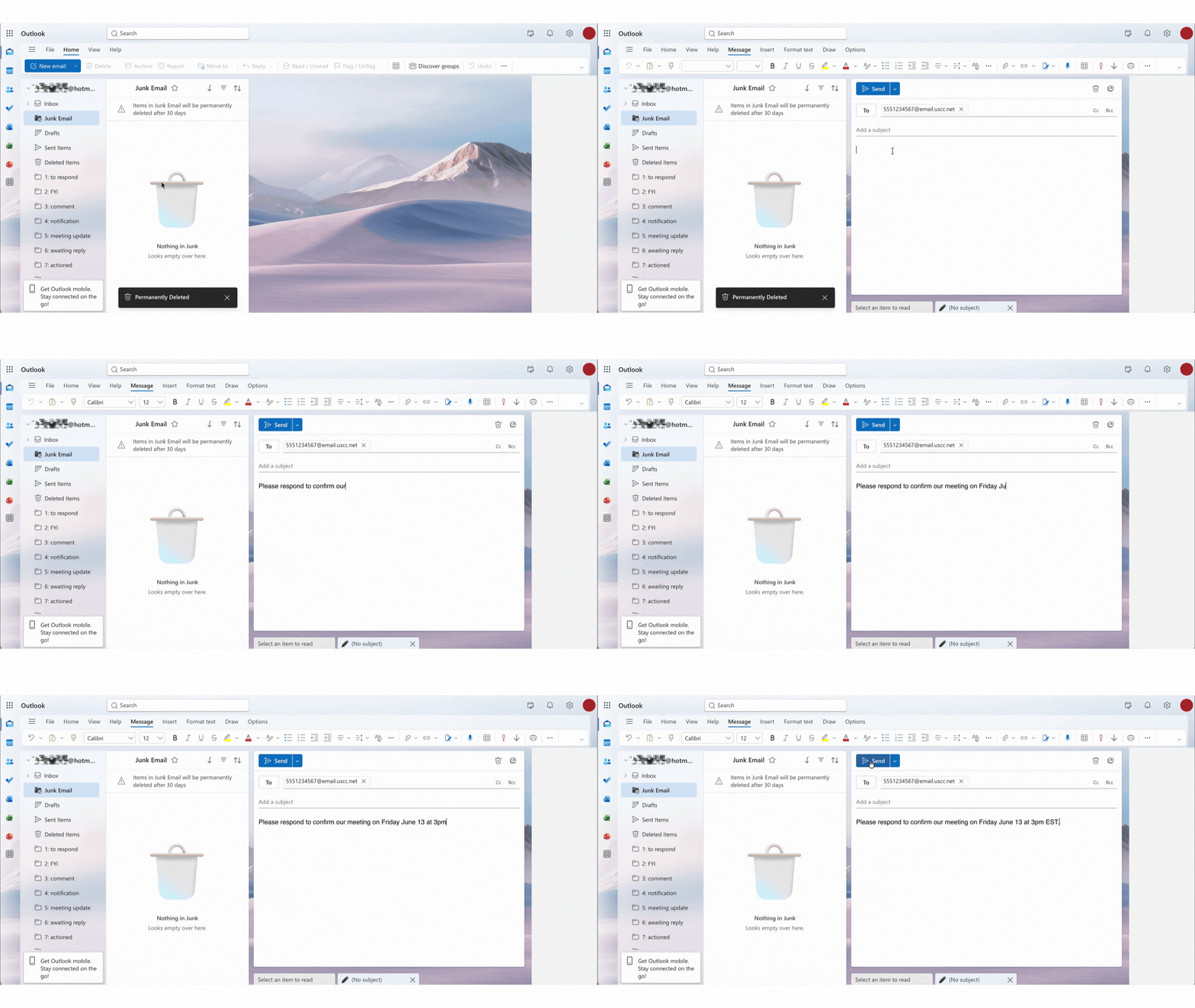
- Open Outlook and create a new email.
- In the To field, type the gateway address for the recipient's carrier. (Before sending, verify the To field shows the raw gateway address and not a display name Outlook has pulled from your contacts.)
- Leave the subject line blank.
- Keep your message body under 160 characters.
- Click Send.
The 160-character limit and MMS
SMS is capped at 160 characters including spaces and punctuation. The 160-character limit is a technical constraint of the SMS protocol, not a carrier preference. Going over it means the carrier has to make a decision: split the message, truncate it, or drop it. None of those are predictable.
Most carriers with active gateways also offer an MMS gateway for longer messages and images. For Verizon, the MMS domain is vzwpix.com rather than vtext.com. Given that Verizon's gateway is already degraded and approaching end of life, MMS via that gateway is especially unreliable. Stick with SMS and the 160-character limit.
Why email to text has mostly stopped working
The free carrier gateways were built in a different era. They had no sender authentication, no business verification, and no spam controls, which made them a target for phishing and smishing campaigns. As carriers moved to a regulated messaging standard called 10DLC (10-Digit Long Code), which requires businesses to register their identity before sending texts, the unregistered gateway model became incompatible with where the industry was going.
AT&T shut down txt.att.net on June 17, 2025. T-Mobile's tmomail.net stopped delivering reliably in late 2024 with no formal announcement. Verizon began degrading its service in late 2024 and has announced a full shutdown by March 31, 2027. Boost Mobile's gateway closed in 2023 following the DISH merger.
The method still works for some smaller carriers. US Cellular's gateway is still active at the time of writing, though T-Mobile completed its acquisition of US Cellular in August 2025, and the service's future is uncertain. Google Fi's gateway is reportedly working but has had intermittent issues. For anyone on the big three, the free gateway method doesn't work.
What to use instead for AT&T, T-Mobile, and Verizon
If you need to send texts from your email and your recipients are on AT&T, T-Mobile, or Verizon, the gateway method won't reach them reliably. The practical alternative is a dedicated email-to-SMS service: a platform that lets you send texts by composing a regular email, but routes delivery through 10DLC-registered numbers rather than the old carrier gateways.
Services like TextBolt, Textmagic, and TXTImpact operate this way. You compose an email in Gmail or Outlook, address it to a number at the service's domain, and they handle the delivery through compliant carrier connections. Most offer a free trial. Setup time is typically under 30 minutes.
If you find yourself reaching for SMS because email isn't getting responses, the issue is usually inbox prioritization: yours or theirs.
Sending from your phone vs. your desk
If you're already on your phone, texting directly is faster and more reliable than any gateway method. The email-to-text approach earns its keep when you're mid-task at a computer and don't want to switch devices.
For sending a regular email from your phone, the how to send an email from your phone guide covers Gmail and Outlook on iOS and Android. For formatting a phone number inside an email message, see how to email a phone number.
WhatsApp on desktop: A faster alternative if the recipient uses it
If the person you're trying to reach uses WhatsApp, the desktop app is worth considering before you set up a dedicated SMS service. WhatsApp Web and the WhatsApp desktop app let you send messages from your computer using a full keyboard, with no carrier limitations and no character cap.
The practical difference from email-to-SMS: WhatsApp messages deliver reliably regardless of the recipient's mobile carrier, and replies come back to the same window. The obvious limitation is that both sides need a WhatsApp account. If your recipient is a consumer contact or someone in your personal network, they probably have one. If you're reaching a business contact who doesn't use WhatsApp, a dedicated email-to-SMS service is still the better route.
When a text feels faster than email, something's broken upstream
If you're managing high volumes of client or prospect email, the trigger is usually the same: you sent something, there's been no reply, and a text feels more direct. You're not sure if they missed it, or if it's buried somewhere in their inbox.
That's a reasonable call. But if it happens regularly, the underlying issue is often inbox prioritization on both ends. A systematic review of 25 years of email research, published in the Journal of Occupational and Organizational Psychology, found that the most effective email users consistently triage incoming messages rather than treating their inbox as a flat list, and that people who don't triage miss things.
According to the Fyxer Admin Burden Index, a 2026 survey of 5,000 UK and US office workers, employees spend an average of 4.3 hours per day writing and responding to email. When nearly half the workday goes to inbox management, messages that should be seen get buried, and that's when people start looking for alternatives like SMS to cut through.
Fyxer organizes your inbox inside Gmail and Outlook, keeping client messages front and center so they don't get lost under notifications and newsletters. If the reason you're reaching for a text is that your email hasn't landed where it should, that's the problem it addresses.