Fyxer for ChatGPT: The app that drafts new emails in your voice
Done writing emails from scratch, but want to avoid template AI responses? Fyxer’s app for ChatGPT drafts new emails that sound like you, saving you hours every week.
Team Fyxer
If you already use AI to draft new emails, you've probably hit the same wall more than once. ChatGPT can instantly turn out a decent draft, but it takes time to edit before it's ready to send. That's because it needs to:
Sound like you
Reflect your work context
Pull in relevant context from past threads
ChatGPT is incredible at generating text, but it has one major limitation when it comes to email: it doesn't know your inbox context.
We've launched the Fyxer app for ChatGPT to combine your work inbox context with the power of ChatGPT. It connects your Fyxer account to ChatGPT so you can instantly draft the emails you need, and avoid endless editing.
The goal: emails that sound like you
The best email drafting experience takes the task completely off your plate. The goal is for you to review the email and say "Yes, that's exactly how I would have written it."
That's what we built the Fyxer app for ChatGPT to do. Fyxer already knows if you never write "Kind regards", prefer a professional tone, and only schedule external calls after 11:00.
Instead of using AI to generate template emails that still require you to fill in the gaps, Fyxer helps ChatGPT draft emails that reflect your voice and how you actually work.
Fyxer's ChatGPT app allows you to draft emails using your real writing style and inbox context — not just what you remember to type into a chat window.
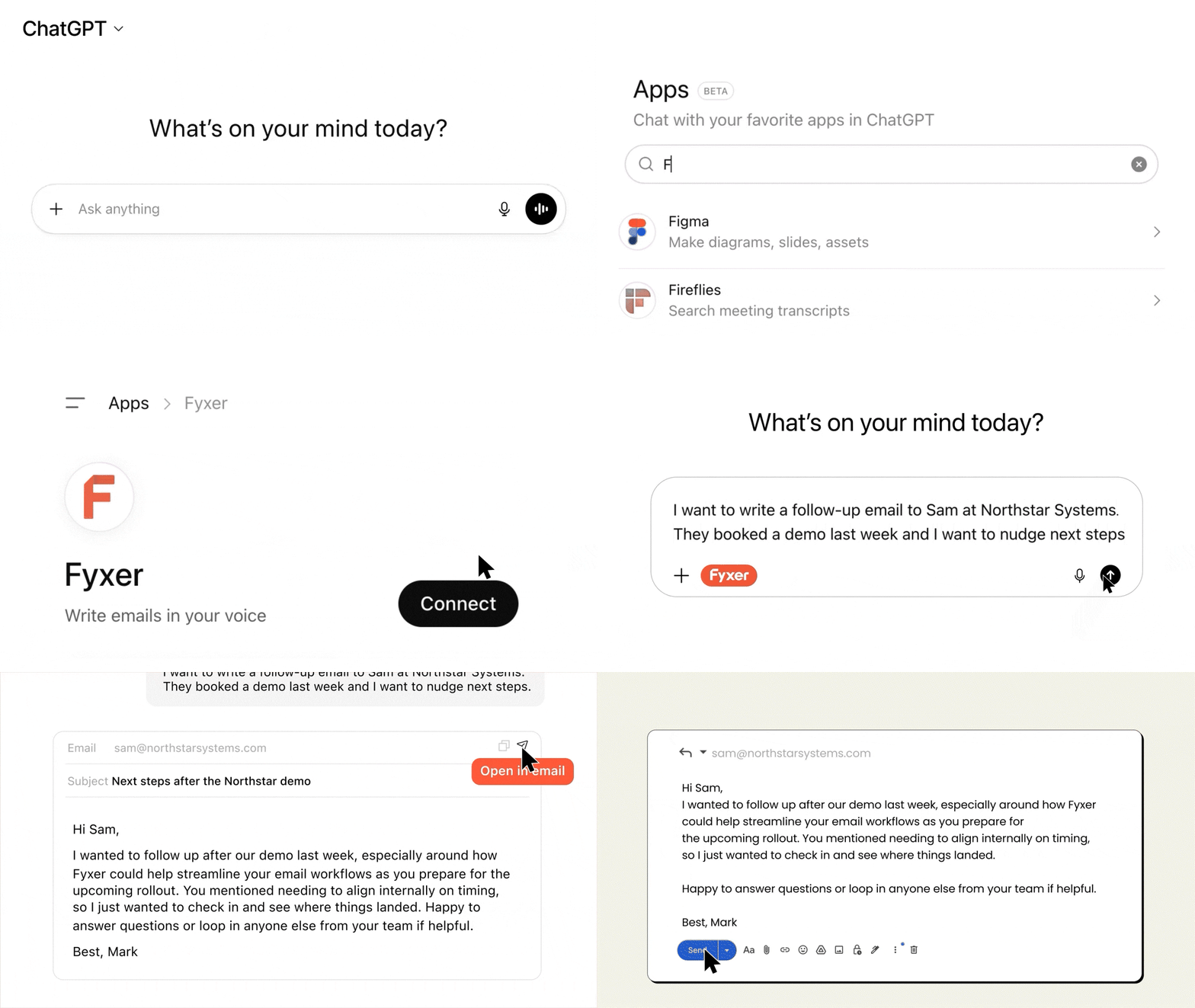
ChatGPT drafts a response using your writing style and context
One click drops the email into your inbox
Review and send
Connects your inbox context
ChatGPT can generate an email in seconds — but it doesn't know that you skip the small talk, or that you always share actions in a bulleted list. Fyxer does. The app brings that context into every draft automatically. This avoids constantly summarizing threads and pasting background information just to get a useful draft.
Drafts in your voice
Fyxer has learned from the way you already communicate. By connecting Fyxer to ChatGPT, your past emails and meeting notes inform every new draft. The draft that’s generated needs less prompting, and re-prompting, before it's ready to send.
Sends with one click
Most AI drafting tools still leave you with a multi-step workflow:
Write prompt
Generate draft
Re-prompt to improve
Copy text
Switch tabs
Paste into email platform
Edit and reformat
Review
Send
Fyxer removes that friction so you can go from prompt to inbox in one click.
Who is the Fyxer app for ChatGPT for?
1. Professionals who want help drafting emails
If you've been looking for ways to spend less time writing emails and more time focused on the rest of your role, this is for you.
Fyxer is the email assistant that organizes your inbox, writes draft replies, and summarizes meeting notes. You get to spend less time in your inbox and more time on everything else. Connect the Fyxer app for ChatGPT and you can draft emails from scratch in your voice, so you're never left staring at a blank page.
2. Professionals already using ChatGPT to draft emails
If you're already using ChatGPT to write emails, you know it can get you 80% of the way there. But it’s the last 20% that drains your time. That's what Fyxer solves.
By connecting your Fyxer account to ChatGPT, the app brings your writing style, inbox context, and past conversations into every draft automatically. You get the speed of ChatGPT with output that sounds like you. No more back-and-forth prompting and fewer rewrites.
The Fyxer app is safe and secure
Fyxer has access to your inbox and calendar, but ChatGPT never does. It can only read the new email drafts that you choose to create with the Fyxer app.
Fyxer adheres to the highest industry standards including:
SOC 2 Type 2
ISO 27001
GDPR
HIPAA compliance
How to connect Fyxer to ChatGPT
Here’s how to connect the Fyxer app for ChatGPT:
Open ChatGPT → Navigate to “Apps” → Type “Fyxer” into the search bar → Click “Connect”
No. ChatGPT never has direct access to your inbox or calendar. Fyxer reads your inbox context to inform the draft, but only the finished email draft is passed to ChatGPT — none of your other inbox data. You stay in control at every step.
How is Fyxer different from using ChatGPT on its own?
ChatGPT is a powerful writing tool, but it only knows what you tell it. Fyxer connects your real inbox context (your writing style, past threads, preferences, and calendar) so that ChatGPT can produce a draft that actually reflects how you communicate, without you having to explain yourself every time.
Is the Fyxer ChatGPT app free?
The Fyxer app for ChatGPT is free for all Fyxer users. Fyxer plans start at $22.50/month (billed annually), which gives you full access to all core features: inbox organization, draft replies, smart meeting scheduling, and the meeting Notetaker to record and summarize your meetings — plus the ChatGPT app.
Which email platforms does the Fyxer app work with?
Fyxer works with both Gmail and Outlook.
Is there a limit on how many email drafts I can generate?
No. There's no cap on the number of email drafts you can generate with the Fyxer app for ChatGPT.